Contrastive Reasons
The algorithms to compute contrastive reasons for multi-class classification problems are still under development and should be available in the next versions of PyXAI (however, the contrastive reasons for binary classification can be calculated).
Unlike abductive explanations that explain why an instance $x$ is classified as belonging to a given class, the contrastive explanations explains why $x$ has not been classified by the ML model as expected.
Let 𝑓 be a Boolean function represented by a random forest 𝑅𝐹, 𝑥 be an instance and 1 (resp. 0) the prediction of 𝑅𝐹 on 𝑥 (𝑓(𝑥)=1 (resp $f(x)=0$)), a contrastive reason for $x$ is a term $t$ such that:
- $t \subseteq t_{x}$, $t_{x} \setminus t$ is not an implicant of $f;$
- for every $\ell \in t$, $t \setminus {\ell}$ does not satisfy this previous condition (i.e., $t$ is minimal w.r.t. set inclusion).
Formally, a contrastive reason for $x$ is a subset $t$ of the characteristics of $x$ that is minimal w.r.t. set inclusion among those such that at least one instance $x’$ that coincides with $x$ except on the characteristics from $t$ is not classified by the decision tree as $x$ is. Stated otherwise, a contrastive reason represents adjustments of the features that we have to do to change the prediction for an instance.
A contrastive reason is minimal w.r.t. set inclusion, i.e. there is no subset of this reason which is also a contrastive reason. A minimal contrastive reason for $x$ is a contrastive reason for $x$ that contains a minimal number of literals. In other words, a minimal contrastive reason has a minimal size.
More information about contrastive reasons can be found in the paper On the Explanatory Power of Decision Trees.
The function ExplainerRF.minimal_contrastive_reason allows computing this kind of explanation.
The library also provides a way to check that a reason is contrastive using the function is_contrastive_reason.
For random forests, PyXAI can only compute minimal contrastive reasons.
The PyXAI library provides a way to check that a reason is contrastive:
The basic methods (initialize, set_instance, to_features, is_reason, …) of the Explainer module used in the next examples are described in the Explainer Principles page.
Example from Hand-Crafted Trees
For this example, we take the random forest of the Building Models page consisting of $4$ binary features ($x_1$, $x_2$, $x_3$ and $x_4$).
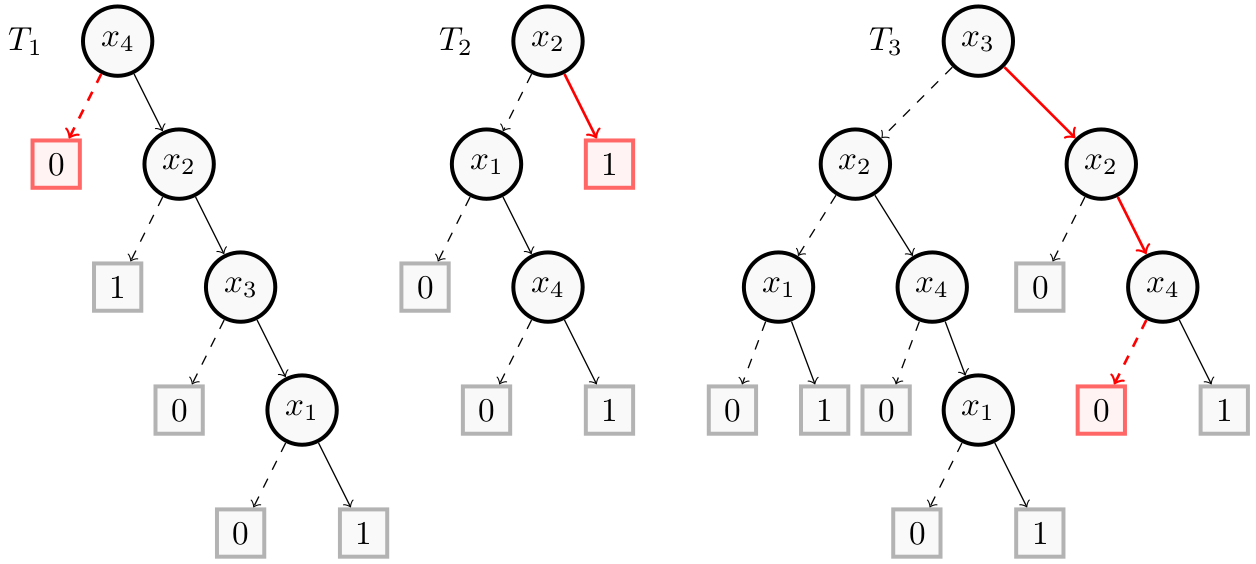
The following figure shows the new instance $x’ = (1,1,1,0)$ created from the contrastive reason $(x_4)$ in red for the instance $x = (1,1,1,1)$. Thus, the instance $(1,1,1,0)$ that differs with $x$ only on $x_4$ is not classified by $T$ as $x$ is. More precisely, $x’$ is classified as a negative instance while $x$ is classified as a positive instance. Indeed, in this figure, $T_1(x’) = 0$, $T_2(x’) = 1$ and $T_3(x’) = 0$, so $f(x’) = 0$.
Now, we show how to get them with PyXAI. We start by building the random forest:
from pyxai import Builder, Explaining

nodeT1_1 = Builder.DecisionNode(1, left=0, right=1)
nodeT1_3 = Builder.DecisionNode(3, left=0, right=nodeT1_1)
nodeT1_2 = Builder.DecisionNode(2, left=1, right=nodeT1_3)
nodeT1_4 = Builder.DecisionNode(4, left=0, right=nodeT1_2)

tree1 = Builder.DecisionTree(4, nodeT1_4, force_features_equal_to_binaries=True)

nodeT2_4 = Builder.DecisionNode(4, left=0, right=1)
nodeT2_1 = Builder.DecisionNode(1, left=0, right=nodeT2_4)
nodeT2_2 = Builder.DecisionNode(2, left=nodeT2_1, right=1)

tree2 = Builder.DecisionTree(4, nodeT2_2, force_features_equal_to_binaries=True) #4 features but only 3 used

nodeT3_1_1 = Builder.DecisionNode(1, left=0, right=1)
nodeT3_1_2 = Builder.DecisionNode(1, left=0, right=1)
nodeT3_4_1 = Builder.DecisionNode(4, left=0, right=nodeT3_1_1)
nodeT3_4_2 = Builder.DecisionNode(4, left=0, right=1)

nodeT3_2_1 = Builder.DecisionNode(2, left=nodeT3_1_2, right=nodeT3_4_1)
nodeT3_2_2 = Builder.DecisionNode(2, left=0, right=nodeT3_4_2)

nodeT3_3_1 = Builder.DecisionNode(3, left=nodeT3_2_1, right=nodeT3_2_2)

tree3 = Builder.DecisionTree(4, nodeT3_3_1, force_features_equal_to_binaries=True)
forest = Builder.RandomForest([tree1, tree2, tree3], n_classes=2)
We compute the contrastive reasons for these two instances:
explainer = Explaining.initialize(forest)
explainer.set_instance((1,1,1,1))

contrastives = explainer.minimal_contrastive_reason(n=Explaining.ALL)
print("Contrastives:", contrastives)
for contrastive in contrastives:
  assert explainer.is_contrastive_reason(contrastive), "It is not a contrastive reason !"

print("-------------------------------")

explainer.set_instance((0,0,0,0))

contrastives = explainer.minimal_contrastive_reason(n=Explaining.ALL)
print("Contrastives:", contrastives)
for contrastive in contrastives:
  assert explainer.is_contrastive_reason(contrastive), "It is not a contrastive reason !"
Contrastives: ((4,),)
-------------------------------
Contrastives: ((-1, -4),)
Example from a Real Dataset
For this example, we take the mnist49 dataset. We create a model using the hold-out approach (by default, the test size is set to 30%) and select a well-classified instance.
from pyxai import Learning, Explaining

learner = Learning.Scikitlearn("../../../dataset/mnist49.csv",  problem_type='classification')
model = learner.evaluate(splitting_method=Learning.HOLD_OUT, model_type=Learning.RF)
instance, prediction = learner.get_instances(model, n=1, is_correct=True)
--------------   Information   ---------------
Problem type: classification
Instances type: tabular
Labels type: classes

Dataset path: ../../../dataset/mnist49.csv
nFeatures (nAttributes, with the labels): 784
nInstances (nObservations): 13782
nLabels: 2
---------------   Model creation, fitting and evaluation  ---------------
Splitting method: hold-out
Problem type: classification
Models type: random-forest
model_parameters: {}
---------   Evaluation Information   ---------
For the evaluation number 0:
Metrics:
   sklearn_confusion_matrix: [[1689, 26], [25, 1706]]
   accuracy: 98.52002321532211
Number of Training instances: 10336
Number of Testing instances: 3446

---------------   Explainer   ----------------
For the split number 0:
**Random Forest Model**
nClasses: 2
nTrees: 100
nVariables: 29013

---------------   Instances   ----------------
Number of instances selected: 1
----------------------------------------------
We compute one contrastive reason. Since it is a hard task, we put a time_limit. If time_limit is reached, we obtain either an approximation of a contrastive reason (some literals can be redundant) or the empty list if no contrastive reason was found:
explainer = Explaining.initialize(model, instance)
print("instance prediction:", prediction)
print()

contrastive_reason = explainer.minimal_contrastive_reason(n=1, time_limit=10)
if explainer.elapsed_time == Explaining.TIMEOUT:
    print('this is an approximation')
if len(contrastive_reason) > 0:
    print("constrative: ", explainer.to_features(contrastive_reason, contrastive=True))
else:
    print('No contrative reason found')
instance prediction: 4

minimal_contrastive_reason: end by time_limit or 'n' reached.
this is an approximation
constrative:  ['153 <= 1.5', '158 <= 2.5', '161 > 0.5', '162 > 0.5', '180 <= 253.5', '185 <= 1.0', '186 <= 2.5', '189 in ]0.5, 252.5]', '208 <= 41.5', '209 <= 232.5', '210 <= 251.5', '211 <= 31.5', '212 <= 56.5', '213 <= 20.0', '215 <= 10.5', '216 > 0.5', '234 <= 0.5', '235 <= 253.5', '236 <= 1.5', '237 <= 253.5', '238 <= 3.0', '239 <= 248.5', '240 <= 254.5', '241 <= 1.5', '242 <= 12.5', '262 <= 1.5', '267 <= 0.5', '273 > 3.5', '295 <= 251.5', '319 <= 202.5', '323 <= 179.5', '325 <= 253.5', '343 <= 252.5', '347 <= 38.0', '379 <= 251.5', '401 <= 252.5', '429 > 252.5', '431 > 231.5', '463 <= 1.0', '466 > 0.5', '492 <= 0.5', '493 <= 254.5', '575 <= 254.5', '603 <= 253.5', '606 > 253.5', '611 <= 45.5', '623 <= 253.5', '656 <= 253.5', '661 <= 252.5', '664 <= 252.5', '710 <= 0.5', '717 <= 5.0', '739 <= 0.5', '740 <= 2.5', '746 <= 4.5', '747 <= 22.0', '748 <= 15.0']
Other types of explanations are presented in the Explanations Computation page.